Free PAR-Q Form Template for Personal Trainers (2026)
Every trainer needs a PAR-Q on file for every client before the first session; your insurer expects it, and it is the simplest way to catch a health risk before it becomes an incident on the gym floor. Here is a complete, ready-to-use template you can copy or print, plus how to run it as a digital PAR-Q form: sent before session one, confirmed by the client and stored where you can find it years later.

What a PAR-Q form covers
A PAR-Q (Physical Activity Readiness Questionnaire) is a short pre-exercise health screen. It asks a new client about heart conditions, chest pain, dizziness, joint problems and relevant medication: the handful of red flags where "just start training" is the wrong answer. Any yes answer means one thing: recommend the client checks in with their GP before you load them up.
If you want the background on each question (what it screens for and what a yes actually means), how the PAR-Q differs from the PAR-Q+, and whether the form is legally required, read What is a PAR-Q? Every question explained. This page is the template and how to use it.
The PAR-Q template
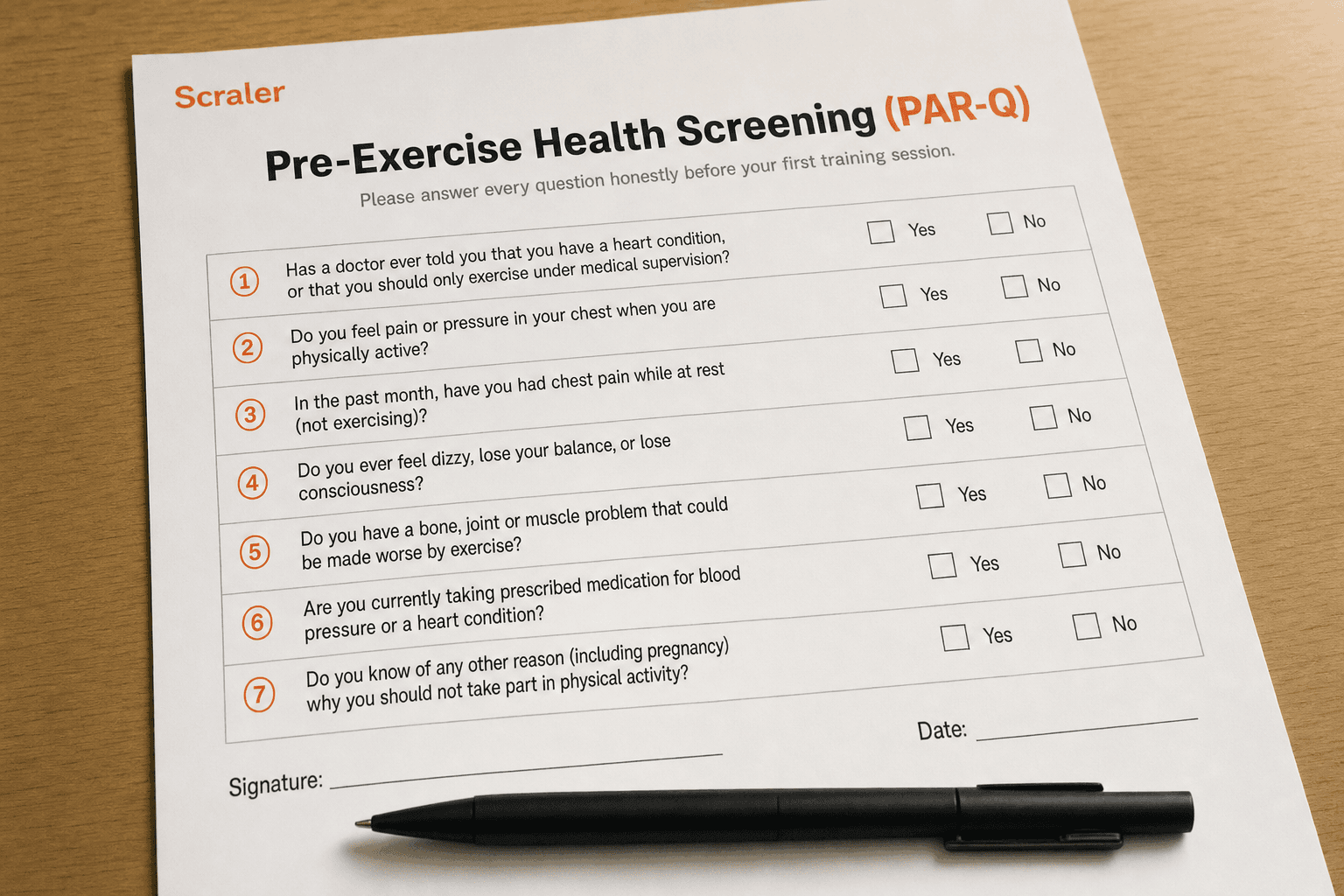
Nine questions: seven yes/no screens, a details field, and a consent confirmation (the consent line matters; health answers are special-category data under UK GDPR, so collect explicit consent when you collect the answers). Read it below, or grab the print-ready A4 PDF with the download button.
- 1
Has a doctor ever told you that you have a heart condition, or that you should only exercise under medical supervision?
Yes / No - 2
Do you feel pain or pressure in your chest when you are physically active?
Yes / No - 3
In the past month, have you had chest pain while at rest (not exercising)?
Yes / No - 4
Do you ever feel dizzy, lose your balance, or lose consciousness?
Yes / No - 5
Do you have a bone, joint or muscle problem (for example back, knee or hip) that could be made worse by exercise?
Yes / No - 6
Are you currently taking prescribed medication for blood pressure or a heart condition?
Yes / No - 7
Do you know of any other reason (including pregnancy) why you should not take part in physical activity?
Yes / No - 8
If you answered yes to any of the questions above, please give details.
Open answer - 9
I confirm my answers are accurate, and I consent to my trainer securely storing this health information to plan safe and appropriate training.
Yes / No
The wording is our own; the official PAR-Q+ is copyrighted and may only be reproduced unaltered. How the two compare: PAR-Q vs PAR-Q+.
How to use it
- 1.Before the first session, not during. Send the form with your welcome message. A red flag is much easier to handle three days before a session than three minutes into one. Pair it with a client intake form for goals and lifestyle.
- 2.Any yes → GP before load. You are not diagnosing anything. The client answers yes, you recommend a quick GP conversation, and you train around the flag (or wait for clearance). That is the entire protocol.
- 3.Get it signed and dated. An unsigned screening form protects nobody. Signature (or a recorded digital confirmation) plus a date is what makes it evidence.
- 4.Store it for the long haul. Keep the completed form for the length of the client relationship and roughly six years after it ends. That is the UK limitation window for a claim. Details in Do personal trainers need a PAR-Q?
- 5.Re-screen when things change. Annually is a sensible default, and always after an injury, diagnosis, surgery or pregnancy.
Paper vs digital PAR-Q forms
A PAR-Q only works if it is completed before the first session, signed, readable and findable years later. Paper fails all four often enough that most trainers have lived at least one "where is that form" moment.
- Filled in on the gym floor, minutes before the session
- Rushed handwriting, skipped questions, missing signatures
- A folder at the studio: unsecured health data, no access control
- Hardest to find at the exact moment you need it
- Completed during signup, before session one
- Required questions cannot be skipped
- Access-controlled, stored with the client record
- Retrievable in seconds, deletable when retention ends
How to send, sign and store a PAR-Q online
- 1.Send it with onboarding, automatically. Not "I must remember to email the PDF": the screen is a built-in step of becoming your client, completed on their phone before session one.
- 2.Make the confirmation the signature. The client answers the consent question explicitly ("I confirm my answers are accurate, and I consent to my trainer securely storing this health information"), and the submission is dated. That recorded confirmation does the job of an ink signature for most insurers; check your own policy wording if it asks for a physical signature.
- 3.Read every answer before session one. Scan the seven yes/no screens for any yes and handle the GP recommendation in writing, the same protocol as paper.
- 4.Store the answers on the client record. Same place as their programme and check-ins, visible only to you, retrievable in seconds, and deleted when your retention window ends.
The GDPR side is the quiet win. Everything the law expects for health data (explicit consent, secure storage, access control, purposeful retention, erasure on request) is manual discipline on paper and default behaviour in a proper system. Consent is captured as a form question, storage is scoped to you, and removing a former client’s data when the retention window ends is a few clicks rather than an archaeology project.

Setting it up in Scraler (about two minutes)
- 1.Open Clients → Onboarding and choose Add form, then pick the Pre-Exercise Health Screening (PAR-Q) template. All nine questions, including the consent confirmation, are inserted ready to edit.
- 2.Adjust if you like: reword questions, add injury-history or lifestyle questions, reorder forms. The template is a starting point, not a cage. Our client intake form template lists the lifestyle questions worth adding.
- 3.Done. Every new client now completes the screen during signup, before their first session, and every answer lands on their client profile.
The in-app template inserts the same nine questions published above, so what you read here is exactly what your clients will answer. Scraler records the client’s answers and their consent confirmation; it does not capture a drawn e-signature or a separate signed waiver document.
Add the Pre-Exercise Health Screening (PAR-Q) template to your client onboarding in one click; clients complete it before their first session, and every answer lands on their profile.
Start freeFrequently asked questions
- Is this PAR-Q template free to use?
- Yes. Download the PDF, print it, or adapt it for your own client screening, no attribution and no email address needed.
- Can I edit the questions?
- Yes, it is your form. Keep the seven core health screens intact and add whatever your client base needs; many trainers add injury history and lifestyle questions on top. In Scraler, every template question is editable after you insert it.
- Is a digitally completed PAR-Q as valid as a signed paper one?
- Generally, yes. What insurers and courts care about is that the screening happened, the answers are recorded, and the client confirmed them on a known date. A dated digital submission with an explicit confirmation question does that at least as well as ink. If your policy wording asks for a physical signature, follow the policy.
- Can clients complete the PAR-Q on their phone?
- Yes. In Scraler the screening is part of client signup, completed on any device before their first session.
- Is a PAR-Q legally required in the UK?
- No statute names the PAR-Q, but your insurance and your duty of care effectively require documented pre-exercise screening, which is exactly what a PAR-Q is. See the legal side explained.
- How long should I keep completed forms?
- For the length of the client relationship plus around six years after it ends, matching the general UK limitation period for contract and negligence claims.