AI for Personal Trainers: Let AI Draft, You Approve
An AI personal trainer is software that writes a workout or meal plan from a short brief. For a coach, the safe way to use it is as a first draft: the AI builds the weeks, sets and reps, and you review and change everything before a client sees it. Several coaching platforms include it from $10 a month.

- Use AI to draft, not to decide. A plan reaches a client only after you have read it and changed what is wrong for that person.
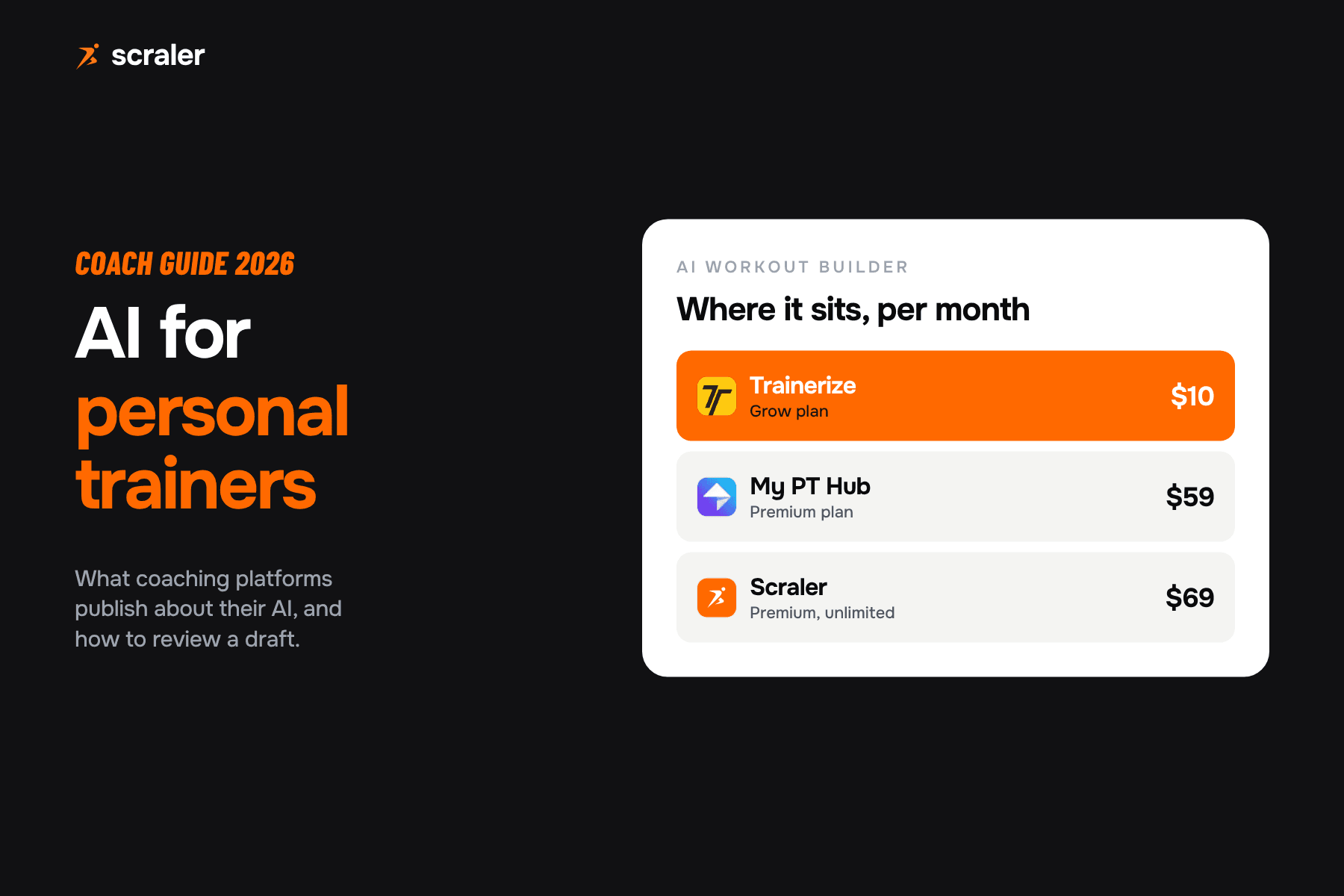
- Several coaching platforms now publish an AI workout builder. Trainerize lists one on its $10 a month Grow plan, My PT Hub on its $59 Premium plan.
- Review every draft against the client: injuries, equipment, weekly volume, progression and exercise swaps. In our experience the checklist below takes around ten minutes for a four week plan.
- On Scraler, AI training plans, meal plans and workouts are unlimited on Premium ($69 a month) and 5 generations a month on Plus.
Search for "AI personal trainer" and most results are apps that coach a consumer directly. This guide is for the other side: you are the coach, you have paying clients, and you want AI to remove the blank page without putting your name on a plan you did not check. The tool and price information comes from each vendor's own pages, read on 7 October 2026. We did not test the other vendors' AI, so there are no scores here. If you build programmes by hand today, our guide to workout builder software covers the manual side.
What is an AI personal trainer for a coach?
For a consumer, an AI personal trainer is an app that tells you what to do in the gym. For a coach, it is a drafting assistant inside the software you already use. You describe a client in a few lines, such as goal, level, days a week and equipment, and it returns a structured programme or a menu with exercises, sets, reps, meals and macros. It is one feature of wider personal trainer software, so judge it alongside the rest of the platform.
The output is a draft. It does not know that your client had a shoulder operation in March, that the gym has no cable machine, or that they hate lunges. You do. That is the whole argument for keeping the coach in the loop, and it is also the fastest way to use AI well: you spend your time on judgment, not on typing out week one of a four week block.
What can AI do for a personal trainer today?
The platforms we read publish four kinds of AI feature. Not every vendor has all four.
- What the AI does
- Builds weeks, workouts, exercises, sets and reps from a brief or from your notes
- Who publishes it
- Trainerize, Everfit, My PT Hub, Scraler
- What the AI does
- Fills days with meals that hit calorie and macro targets
- Who publishes it
- Everfit, Scraler
- What the AI does
- Drafts a reply in your tone for you to edit and send
- Who publishes it
- Everfit (Smart Response), My PT Hub (Check-Ins AI)
- What the AI does
- Applies a plain-words change such as "swap bench press for dumbbell press" or "add a deload week"
- Who publishes it
- Scraler (AI Coach)
| Job | What the AI does | Who publishes it |
|---|---|---|
| Workout drafts | Builds weeks, workouts, exercises, sets and reps from a brief or from your notes | Trainerize, Everfit, My PT Hub, Scraler |
| Meal plan drafts | Fills days with meals that hit calorie and macro targets | Everfit, Scraler |
| Message replies | Drafts a reply in your tone for you to edit and send | Everfit (Smart Response), My PT Hub (Check-Ins AI) |
| Edits to an open plan | Applies a plain-words change such as "swap bench press for dumbbell press" or "add a deload week" | Scraler (AI Coach) |
Drafting is where AI saves the most time, because building a first version is the slow part and checking one is fast. Message replies are the second win: Everfit describes Smart Response as AI-drafted replies "in your voice", with you reviewing, editing and sending. The principle is the same in every case. The AI proposes and you press send.
Which AI workout generators and planners can coaches use?
Here is what each platform says about its AI on its own site. This is a comparison of published features and prices, not of how well the AI performs.
- AI features published
- AI Workout Builder
- Where it sits and the price listed
- Grow plan, $10 a month, 2 client seats
- AI features published
- AI Workout Builder, AI meal plans, Smart Response, Olly assistant
- Where it sits and the price listed
- Smart Response on Pro and Studio, Pro from $19 a month for 5 clients. Plan for the builder not stated
- AI features published
- AI workout builder, Check-Ins AI
- Where it sits and the price listed
- Premium $59 a month (50% off the first 2 months). Check-Ins AI is a $12 a month add-on
- AI features published
- No AI feature in its plan lists
- Where it sits and the price listed
- Not applicable
- AI features published
- AI training plans, AI workouts, AI meal plans, AI Coach chat
- Where it sits and the price listed
- Plus $49 a month with 5 generations, Premium $69 unlimited
| Platform | AI features published | Where it sits and the price listed |
|---|---|---|
| Trainerize | AI Workout Builder | Grow plan, $10 a month, 2 client seats |
| Everfit | AI Workout Builder, AI meal plans, Smart Response, Olly assistant | Smart Response on Pro and Studio, Pro from $19 a month for 5 clients. Plan for the builder not stated |
| My PT Hub | AI workout builder, Check-Ins AI | Premium $59 a month (50% off the first 2 months). Check-Ins AI is a $12 a month add-on |
| TrueCoach | No AI feature in its plan lists | Not applicable |
| Scraler | AI training plans, AI workouts, AI meal plans, AI Coach chat | Plus $49 a month with 5 generations, Premium $69 unlimited |
Two things stand out. First, an AI workout builder is no longer a premium extra: Trainerize puts one on its second plan. Second, "AI" covers very different jobs, from a one-shot plan generator to a chat that edits a plan you already built. Pick the vendor by the job you want done, and check the plan limits on the pricing page before you rely on it.
Why should the coach approve every AI draft?
Because you are the one accountable. A client who gets hurt or a meal plan that ignores an allergy is your problem, not the software's. AI writes plausible plans fast, and plausible is not the same as right for this person. The fix is a workflow where the draft is clearly a draft.
- 1Intake
Goal, level, injuries, equipment and schedule from your form or call.
- 2AI draft
Brief the AI with those details. It builds the whole plan.
- 3Coach edits
You change exercises, volume and progression. Nothing is sent yet.
- 4Client app
You save and assign the plan. The client sees your version.
- 5Feedback loop
Check-ins and logged sessions tell you what to change next week.
How do you review an AI workout plan before a client sees it?
Run the same pass every time. In our experience it takes around ten minutes for a four week plan and catches the problems that matter.
- 1.Injuries and limits. Remove or swap anything the client cannot do. Check the brief mentioned them; AI cannot avoid what it was not told.
- 2.Equipment. Every exercise must exist in the client's gym or at home.
- 3.Weekly volume. Count hard sets per muscle group per week and compare it with what the client can recover from.
- 4.Progression. Look for a real rule across weeks, such as add reps then load, not the same numbers copied down.
- 5.Exercise choice. Swap movements the client dislikes or cannot learn quickly. Check names match your exercise video library so the client sees a demo.
- 6.Recovery. Check rest days, session length and a deload if the block is long.
If a plan fails two or three checks, do not patch it by hand. Change the brief and generate again, or ask the editor to fix one issue at a time. A better brief beats a long edit.
How do you use an AI meal plan generator without trusting it blindly?
Set the targets yourself first. Work out calories and the protein, carbs and fat split with a calculator you trust, such as our free macro calculator or protein calculator, then give those numbers to the AI as the target. Do not ask it to choose them.
- Check the totals. Add up the day. If the plan says 2,200 kcal and the foods add to 2,000, trust the foods.
- Check the foods exist. On Scraler every ingredient in an AI meal plan is matched to the food database, so the macros come from real entries rather than the AI's guess.
- Check allergies and diet rules line by line, especially gluten, nuts and dairy.
- Check it is something the client will eat. A perfect plan with food they dislike fails in week two.
For the structure around the plan, our meal plan template and personalized nutrition plan guide cover what a client-ready plan contains.
How does AI plan generation work in Scraler?
In Scraler you open the training plan builder, choose Build with AI, pick a Calendar or Fixed layout, and describe the plan in your own words. Chips pin exact values such as split, weeks, days a week, level and equipment, and pinned values override anything the AI infers. Generating can take up to 60 seconds.
The plan then opens in the builder, not saved. You can change every workout, exercise, set, rep and rest time, and the AI Coach button opens a chat next to the plan for plain-words edits like "add a deload week based on week 1". Nothing is saved until you click save, and you can undo any chat message with Revert to this point. Meal plans work the same way: set the targets and a short brief, and the AI fills the days with meals matched to the food database.
- 5 generations a month
- Shared by AI plans, meals, workouts and Coach chats
- Unlimited AI generation
- Payments, community, landing pages
- Everything in Premium
- Branded app, automations, studio
Scraler drafts the plan, you change every set and rep, and the client sees only the version you save. Their logged sessions and check-ins come back into the same place.
See the workout plannerWhat can you ask ChatGPT as a personal trainer?
A general chatbot can draft a plan too, but it does not know your client, your exercise library or your food database, so you paste facts in and copy the result out. It works best for text jobs around the plan: a client welcome message, a recipe swap list, a rewrite of your check-in questions in a friendlier tone, or a first outline of a four week block you then rebuild properly in your software.
Whatever you use, put the facts in the prompt: goal, level, days, session length, equipment, injuries and foods to avoid. We wrote eight prompts that follow that pattern, plus the review checklist, as a one-page pack. They are starting points that we did not run against a model for this article, so test each one with your own client details and read the output before you use it.
Eight prompts for workouts, meals and client messages, with the ten minute review checklist. Starting points, not tested outputs.
Frequently asked questions
- Can AI replace a personal trainer?
- For a client who just needs a workout list, an app can do part of the job. It cannot watch a squat, adjust to a bad week, read a stressed message or hold someone accountable. For coaches, the useful question is how much typing AI can remove, and the answer is mostly the first draft.
- Is there a free AI personal trainer for coaches?
- Everfit lists a free Starter plan for up to 5 clients, and Trainerize has a free plan, but the AI workout builder is listed on Trainerize's paid Grow plan at $10 a month. General chatbots are free to try, but they are not connected to your clients or exercise library.
- Is an AI workout generator safe to use with clients?
- It is safe as a draft you review, not as a plan you send untouched. Check injuries, equipment, volume and progression before assigning it. The responsibility for the programme stays with you.
- What is the best AI workout planner for personal trainers?
- We have not tested the other platforms' AI, so we do not rank them. Choose by the job: a plan generator, a meal plan generator, reply drafting or plain-words edits. Then check the plan limits and the price on the vendor's pricing page.
- Does Scraler have AI?
- Yes. Scraler can build training plans, workouts and meal plans with AI, and the AI Coach edits an open plan from plain-words requests. Premium and Ultimate are unlimited, Plus has 5 generations a month, and Basic has none. Every plan opens unsaved so you can edit before it goes to a client.