Free Meal Plan Template: Weekly Planner for PDF, Excel and Google Sheets
A meal plan template is a one page weekly grid with breakfast, snacks, lunch and dinner for seven days, space for daily calories and macros, and a grocery list. Download ours free as a PDF, a printable PDF or an Excel and Google Sheets file, then fill it in for yourself or a client.

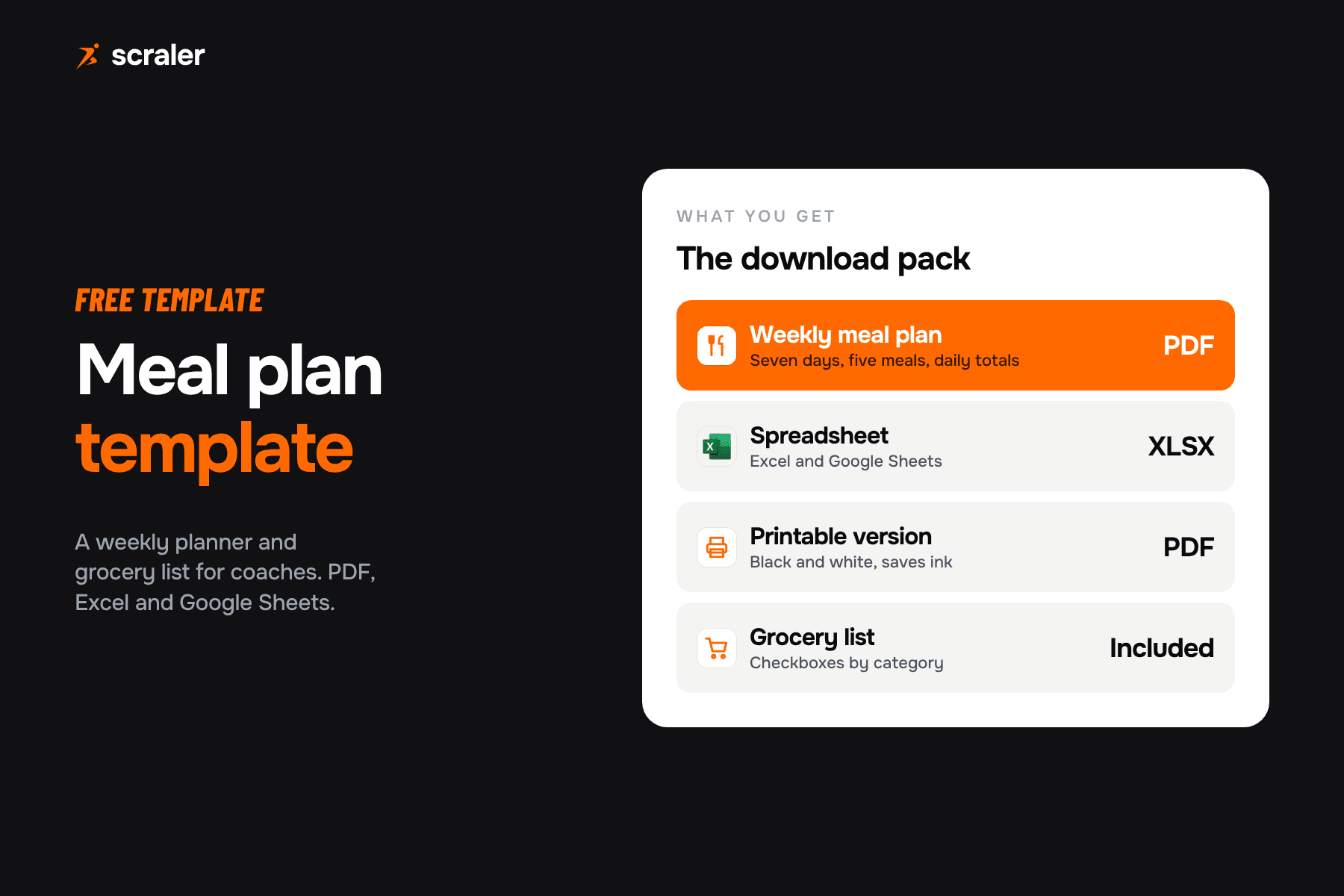
- The free pack has four parts: a weekly meal plan PDF, a black and white printable, an Excel and Google Sheets file with live totals, and a grocery list.
- Fill the plan in this order: set the targets, build lunch and dinner, add breakfast and snacks, check the day total, then write the grocery list.
- Use the Harvard Healthy Eating Plate as a quick sanity check: half vegetables and fruit, a quarter whole grains, a quarter healthy protein.
- A spreadsheet works for a handful of clients. Past that, a meal planner that holds recipes, macros and client delivery in one place saves retyping.
We built this template for coaches who write meal plans for clients, and it works just as well if you are planning your own week. It is ours, so you can use it with clients and put your own name on the plan. Below you get the download, how to use the spreadsheet version, a simple method for filling the plan in, and a look at where a spreadsheet stops being the right tool. If you also program training, the matching workout plan template uses the same approach.
What is a meal plan template?
A meal plan template is a blank, reusable layout for planning what someone eats. The most common layout is a weekly meal plan template: seven day columns, a row for each meal, and a total at the bottom. A good one also carries the targets for the week and a place to list what to buy.
For a coach, the template does two jobs. It gives the client something concrete to follow, and it forces you to check the day add up to the targets before the plan goes out. Without that check, plans drift: dinner gets heavy, snacks get skipped, and the protein number you promised never shows up. For how to set those targets in the first place, see our guide to the personalized nutrition plan.
Where can I download a free weekly meal plan template?
Here. There is no email gate. The pack has the same layout in three formats so you can use whichever fits how you work.
Weekly planner with macro targets and day totals, a grocery list by category, and a one page coach guide. The XLSX opens in Excel and imports into Google Sheets. For a fuller printable list, see our healthy grocery list.
- Best for
- Sending to a client or filling in on a tablet
- What is inside
- Weekly grid, grocery list and prep page, plus a coach guide
- Best for
- Printing at home or the studio
- What is inside
- The same grid and grocery list with no fills, so it uses little ink
- Best for
- Typing the plan and letting the sheet add it up
- What is inside
- Weekly plan, macro tracker with totals, grocery list and an example week
| File | Best for | What is inside |
|---|---|---|
| PDF (colour) | Sending to a client or filling in on a tablet | Weekly grid, grocery list and prep page, plus a coach guide |
| PDF (printable) | Printing at home or the studio | The same grid and grocery list with no fills, so it uses little ink |
| XLSX | Typing the plan and letting the sheet add it up | Weekly plan, macro tracker with totals, grocery list and an example week |
The same grid is also in the printable meal plan template, which has no background colour. Pin it to the fridge and the client can tick off meals with a pen.
How do I use the meal plan template in Excel or Google Sheets?
The XLSX file is a normal spreadsheet with four sheets. It uses only simple SUM, IF and arithmetic formulas, so it behaves the same in Excel and in a meal plan template for Google Sheets.
- 1.Open it. In Excel, double click the file. In Google Sheets, choose File, then Import, upload the XLSX and pick the option to create a new spreadsheet.
- 2.Set the targets. On the Weekly plan sheet, type the daily calorie, protein, carb and fat targets in the shaded row at the top.
- 3.Write the meals. Fill the grid with the meal and its portion, for example "Greek yogurt, 200 g".
- 4.Log the numbers. On the Macro tracker sheet, enter calories and grams for each meal. The day totals and the gap to target update by themselves and flow back to the Weekly plan sheet.
- 5.Make the grocery list. Use the Grocery list sheet to collect the items by category and tick them off while shopping.
The Example week sheet shows one filled in day, marked as an example. Delete it, or keep it as a reference. The numbers in it are made up to show the layout and are not a recommendation for anyone. To fill a real week, start from our macro friendly recipes.
How do I fill in a meal plan for a client?
Work from the targets down to the meals, not the other way round. This order keeps the plan close to the numbers without a lot of rework.
- 1Set the daily targets
Calories first, then protein and fat, with carbs filling the rest.
- 2Build lunch and dinner
They carry the most food, so get them right first.
- 3Add breakfast and snacks
Repeat two or three breakfasts and lunches across the week.
- 4Check the day total
Adjust one meal at a time until it sits near the target.
- 5Write the grocery list
Collect the ingredients by category so shopping is one trip.
If you do not have targets yet, the free macro calculator turns a calorie goal into grams of protein, carbs and fat. The TDEE calculator estimates daily energy use and the protein calculator gives a protein range. Treat all three as a starting point and adjust from check-in data.
The arithmetic is simple. Protein and carbohydrate give 4 kilocalories per gram and fat gives 9. Here is a worked example for a 2,000 calorie day. It is an illustration of the sum, not a recommended split.
What does a balanced plate look like in a meal plan?
Macros tell you how much. They do not tell you whether the plan is made of good food. A quick check is the Healthy Eating Plate from the Harvard T.H. Chan School of Public Health. On the Healthy Eating Plate page (read 7 October 2026), vegetables and fruit make up half of the plate, whole grains a quarter and healthy protein a quarter.
- Vegetables and fruit: aim for colour and variety. Harvard does not count potatoes as vegetables on the plate.
- Whole grains: oats, brown rice, quinoa and whole wheat pasta, rather than refined grains.
- Healthy protein: fish, poultry, beans and nuts. Harvard says to limit red meat and avoid processed meats such as bacon and sausage.
- Healthy oils and drinks: plant oils in moderation, and water, tea or coffee to drink.
You do not have to draw a plate for every meal. Glance down the lunch and dinner rows of the template and ask whether half of each is vegetables or fruit. If it is not, swap one item before the plan goes out.
What should a weekly meal plan template include?
The best template is the one your client actually uses, so keep it short. These are the parts that earn their space:
- Why it earns its place
- Keeps plans from mixing up when you send several a week
- Why it earns its place
- Calories and macros at the top, so every meal is judged against them
- Why it earns its place
- Breakfast, two snacks, lunch and dinner cover most eating patterns
- Why it earns its place
- "Chicken, 150 g" is a plan. "Chicken" is a suggestion
- Why it earns its place
- The check that the plan adds up
- Why it earns its place
- Turns the plan into one shopping trip
- Why it earns its place
- Where you write the batch cooking plan and allowed substitutions
| Section | Why it earns its place |
|---|---|
| Client name and week | Keeps plans from mixing up when you send several a week |
| Daily targets | Calories and macros at the top, so every meal is judged against them |
| Seven days, five meal slots | Breakfast, two snacks, lunch and dinner cover most eating patterns |
| Portions next to each meal | "Chicken, 150 g" is a plan. "Chicken" is a suggestion |
| Day totals | The check that the plan adds up |
| Grocery list | Turns the plan into one shopping trip |
| Prep and swaps notes | Where you write the batch cooking plan and allowed substitutions |
Can I use it as a monthly meal plan template?
Yes. Most clients do not need 28 different days. Build one week, copy it for the next, and swap two or three meals each week so it does not get stale. In the spreadsheet, duplicate the Weekly plan and Macro tracker sheets for each week and rename them Week 1 to Week 4. Keep one Grocery list sheet per week as well.
Why add a grocery list to the meal plan?
Because the plan fails at the supermarket, not on paper. When the client has to work out what to buy from a table of meals, they buy what is easy. A grocery list grouped by produce, protein, grains, dairy and pantry takes one pass through the shop. The template has it on page two of the PDFs and on its own sheet in the spreadsheet.
When should coaches move from a spreadsheet to a meal planner?
A spreadsheet is a fine start. It costs nothing and you control every cell. The cost shows up as you grow: you type each food by hand, look up macros yourself, rebuild the same plan for the next client, and send files that clients cannot log against.
- Free and flexible
- You enter macros by hand
- One file per client, sent as a PDF or link
- Good for a few clients
- Plans built from a recipe library and your own recipes
- Macros tracked against client targets
- Plan sits in the client app next to their workouts
- Built for a full client list
Scraler's meal planner lets you build weekly plans from a recipe library and your own recipes, assign them to clients and bundle recipes into cookbooks. Macro management keeps the targets next to what the client logs, and on the Premium plan AI can draft a plan for you to edit. Plans and recipes live in the same client app as workouts and check-ins. If you are comparing options, see our guide to nutrition coaching software.
Create a plan once, assign it to a client and track their macros in the same app they use for workouts and check-ins. Building meal plans starts on Plus at $49 a month, and unlimited AI plan drafting comes with Premium at $69 (Plus includes 5 AI generations a month).
See the meal plannerIf you are also building your business around the plan, the personal training prices guide covers what to charge for nutrition coaching alongside training, and our PAR-Q template covers health screening before you start a client on anything.
Frequently asked questions
- Is the meal plan template really free?
- Yes. The PDF, the printable PDF and the XLSX are free to download and there is no email gate. You can use them with your own clients. We would ask only that you do not resell the files as they are.
- Does the meal plan template work in Google Sheets?
- Yes. Upload the XLSX to Google Drive or use File, Import in Google Sheets. It uses only SUM and simple IF formulas, so the totals work the same as in Excel.
- How many meals should a weekly meal plan include?
- The template has five slots a day: breakfast, two snacks, lunch and dinner. Leave a slot empty if your client eats three meals. Plan the number of meals around how the client really eats, not a rule.
- How do I work out the calories and macros to put in the plan?
- Start with a calorie target, set protein and fat, and let carbs fill the rest. Our free macro calculator, TDEE calculator and protein calculator give starting numbers. Adjust from the client's check-ins, not from a formula alone.
- Can I give this meal plan to clients as a personal trainer?
- You can give clients a meal plan, but what you may advise depends on your certification and local rules. Keep to general healthy eating guidance, and refer clients with medical conditions to their doctor or a registered dietitian.