Automate client onboarding and recurring tasks. Create workflows that trigger when clients sign up or subscribe, then automatically send messages, assign plans, and request check-ins.
Plus Plan: Automation workflows are available on the Plus plan and above. Upgrade to unlock trigger-based and time-based automation.
Choose between two automation modes: visual workflow builder for trigger-based automation, or workflow templates for time-based scheduling.
Visual drag-and-drop canvas. Create workflows that run when a client signs up or subscribes to a plan.
Schedule actions on specific days. Create multi-week onboarding sequences with actions on Day 1, Day 3, Day 7, etc.
Drag features from the panel onto the canvas to build your automation. Connect nodes to define the execution order.
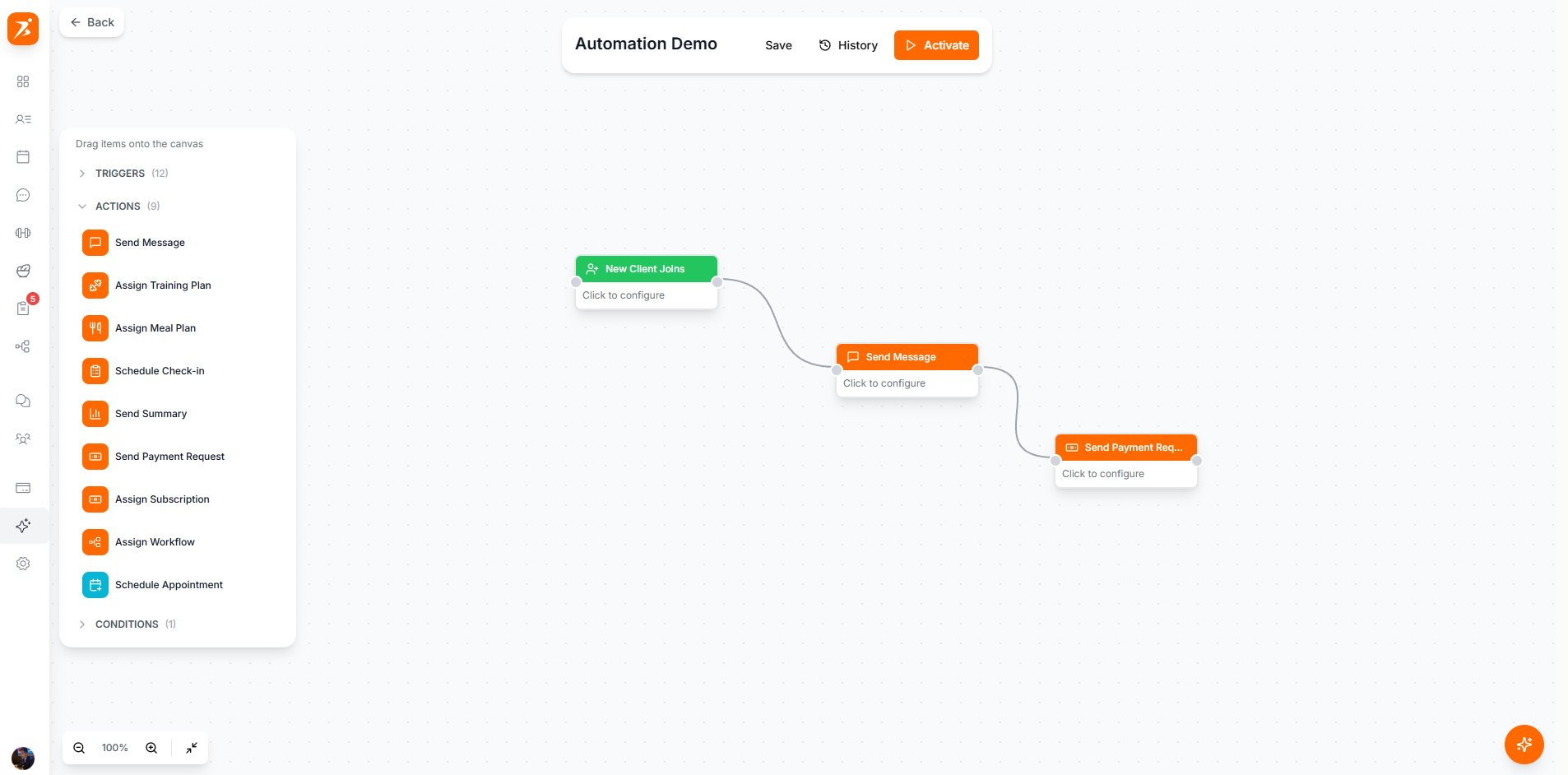
Screenshot: Visual automation builder
Show: sidebar with 3 automations listed (active/draft badges), main canvas with dot grid background, 5 connected nodes (New Client trigger in green → Welcome Message in orange → Wait 24h in yellow → branching to Assign Training Plan in purple and Assign Meal Plan in green), curved connection lines between nodes, zoom controls bottom-left
public/docs/automation-builder.png
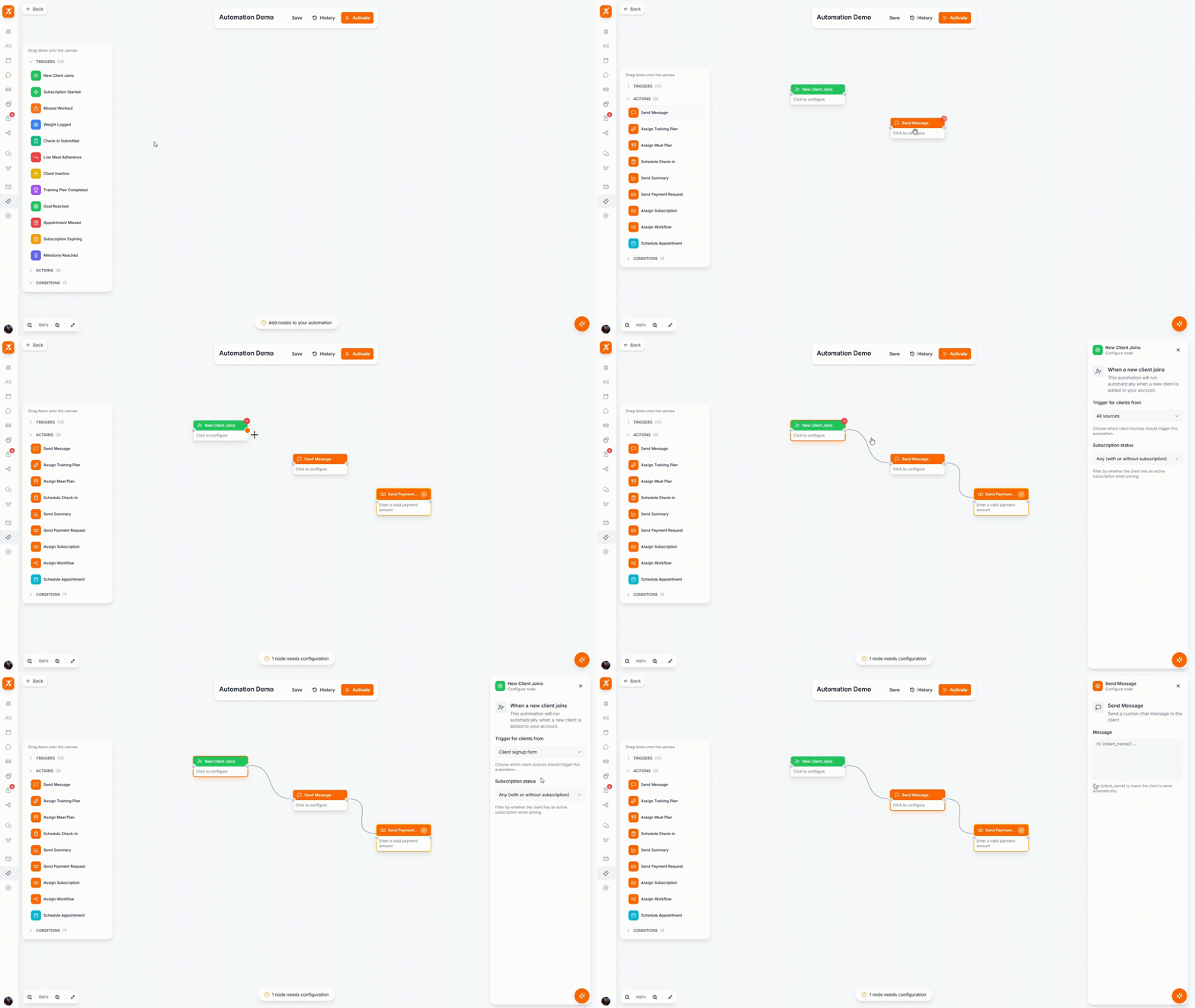
GIF: Building an automation workflow
Record: click "New Automation", drag a "Send Message" action from the panel onto the canvas, then connect it to the trigger node by dragging from one port to another, show the connection line snap into place
public/docs/automation-builder.gif
Events that start the workflow
New Client
Fires when a new client is added to your account
Subscription Started
Fires when a client starts a subscription
Missed Workout
Fires when a client misses a scheduled workout
Weight Logged
Fires when a client logs their weight
Check-in Submitted
Fires when a client submits a check-in response
Low Meal Adherence
Fires when meal plan adherence drops below threshold
Client Inactive
Fires when a client is inactive for a specified number of days
Training Plan Completed
Fires when a client completes their training plan
Goal Reached
Fires when a client reaches a fitness goal
Appointment Missed
Fires when a client misses a scheduled appointment
Subscription Expiring
Fires before a client's subscription is due for renewal
Milestone Reached
Fires when a client hits a milestone (e.g. 10 workouts, 30 days active)
Tasks executed by the workflow
Send Message
Send a chat message to the client
Assign Training Plan
Assign a training plan template
Assign Meal Plan
Assign a meal plan template
Send Check-in
Request a check-up form
Send Summary
Generate progress summary report
Payment Request
Request a payment from client
Assign Subscription
Assign a subscription plan and send payment link
Schedule Appointment
Auto-book a session with the client
Assign Workflow
Assign a workflow template to the client
Click on any node to configure its settings. Each action type has specific options.
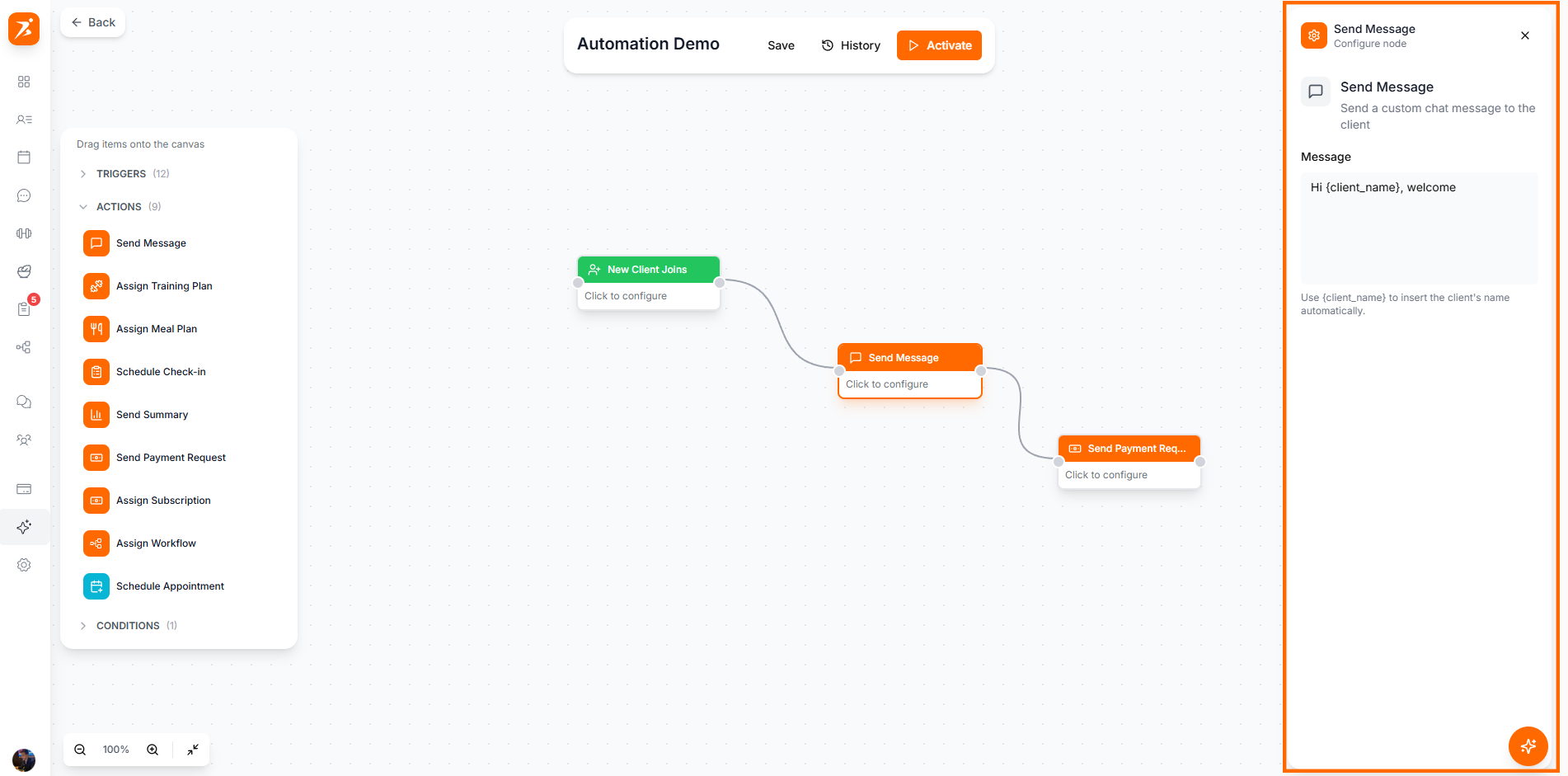
Screenshot: Node configuration panel
Show: a node selected on canvas with its config panel open on the right — "Welcome Message" node with message textarea filled with sample text, or "Assign Training Plan" node with plan dropdown and start date selector
public/docs/node-config.png
Create time-based sequences with actions scheduled on specific days. Perfect for multi-week onboarding programs.
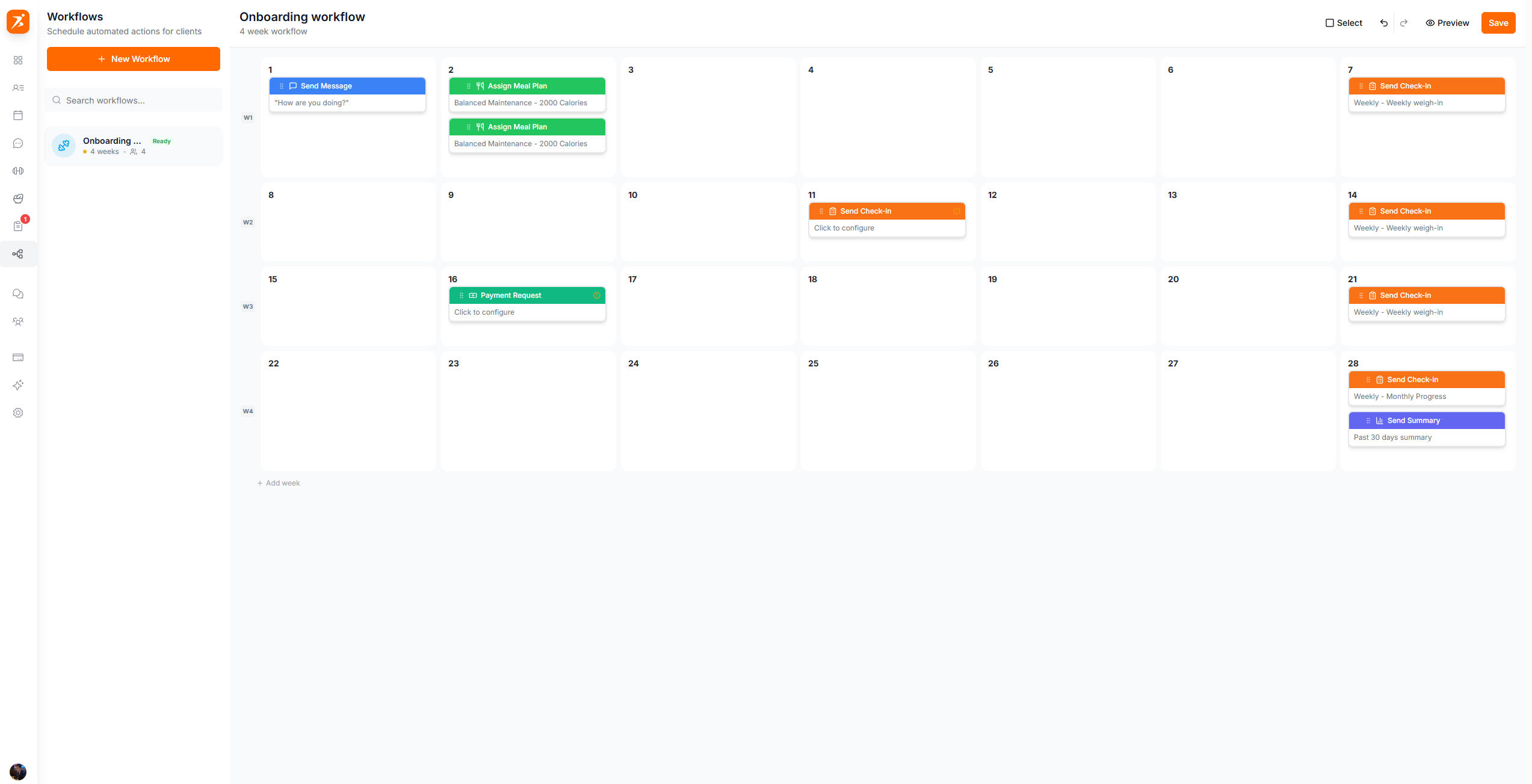
Screenshot: Workflow template calendar
Show: template sidebar with 3 templates (4-Week Onboarding selected, Quick Start, Premium 8-Week), main area showing numbered day grid with action cards on Day 1 (Welcome Message + Training Plan), Day 3 (Check-in), Day 7 (Summary + Meal Plan), save button in header
public/docs/workflow-templates.png
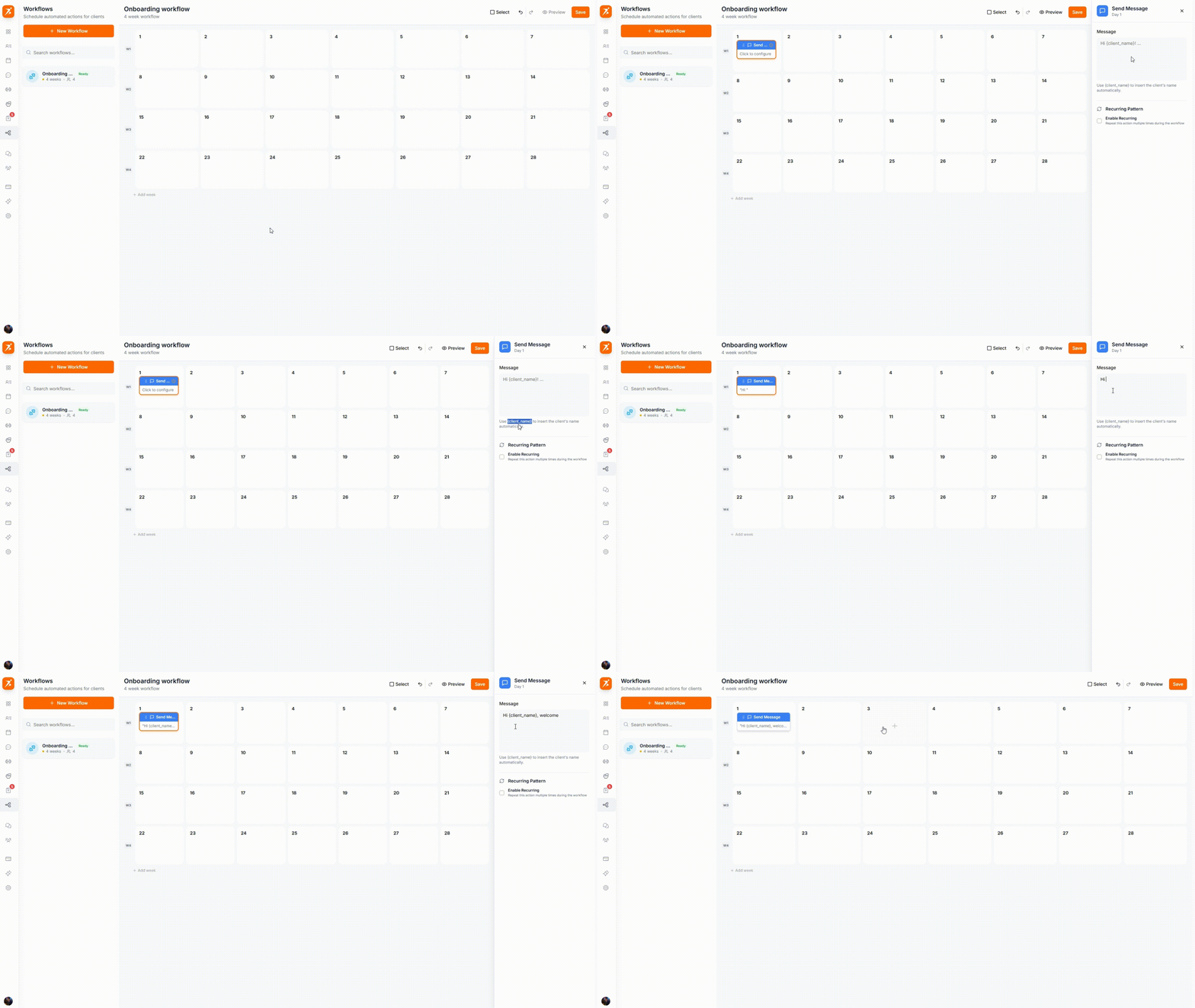
GIF: Adding actions to a workflow day
Record: click "+" on an empty day cell, select "Send Message" from the action picker dropdown, see the action card appear on that day with its color-coded header
public/docs/workflow-templates.gif
Create different automations for different client types. Filter by subscription plan to provide tailored onboarding experiences.
Runs for clients without a subscription
3 automations active
$99/month subscribers
5 automations active
$49/month subscribers
2 automations inactive
Workflows run immediately when triggered. Messages are sent, plans are assigned, and check-ups are requested automatically.
Configure each action with specific settings. Choose which plan to assign, what message to send, and how long to wait.
Toggle workflows on or off at any time. Inactive workflows won't run, allowing you to prepare automations before going live.
Test workflows on real clients before activation. See exactly what will happen step-by-step with detailed results.
Automate your client onboarding
Save hours every week with workflows that run while you sleep.
Get Started Free