
Account and subscription
Your profile, security and plan live under Settings. Open Settings, then Profile or Subscription.
Profile
Change anything and a Save Profile button appears.
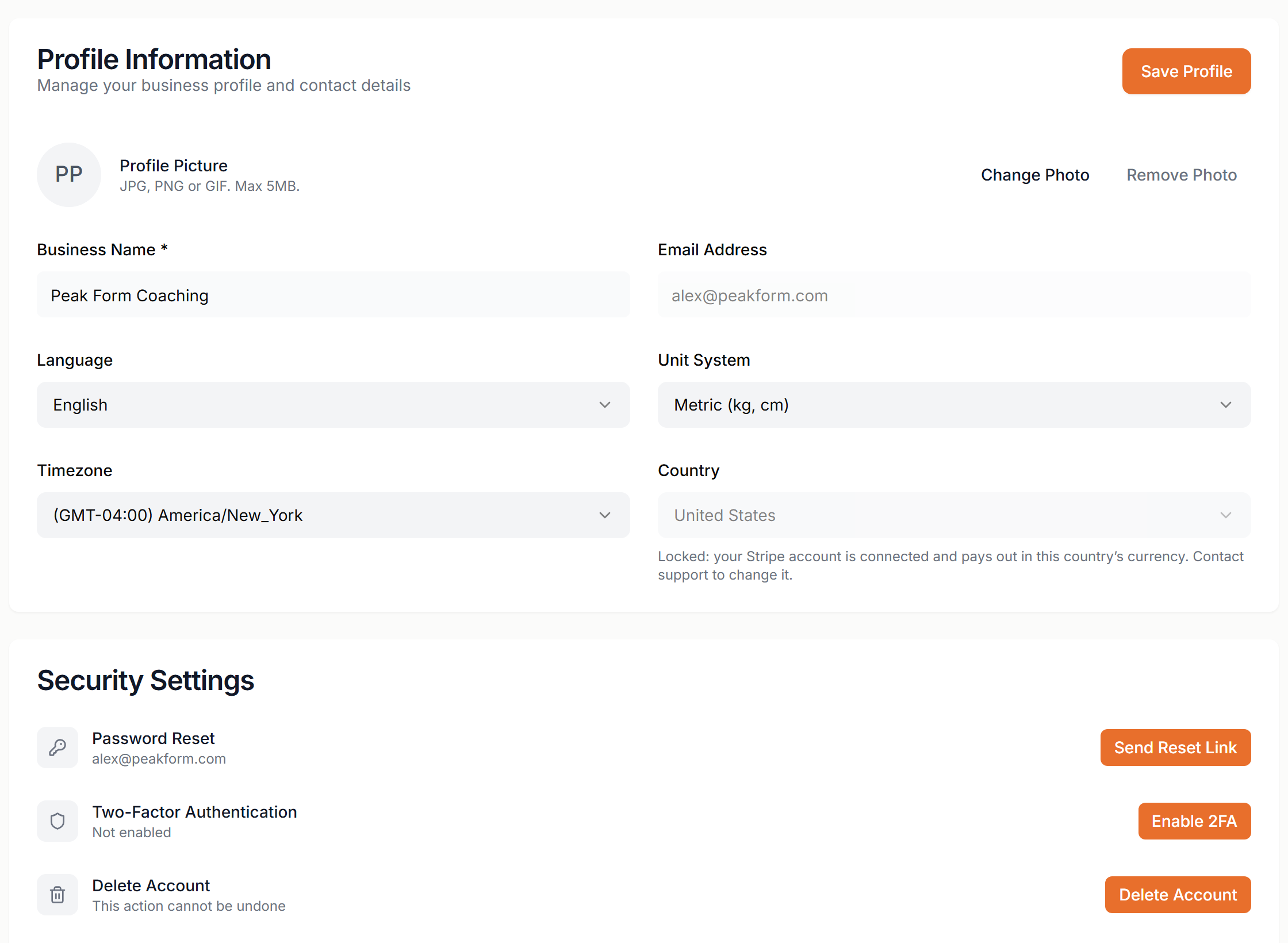
- Profile Picture
- JPG, PNG or GIF, up to 5MB. Use Change Photo or Remove Photo. It shows on your profile and in chat.
- Business Name
- Required. Shown to your clients.
- Email Address
- Read only. Contact support to change it.
- Language
- The language of your dashboard.
- Unit System
- Metric (kg, cm) or Imperial.
- Timezone
- Used for your schedule and appointment times.
- Country
- Your Stripe payout country. It is locked once Stripe is connected. Contact support to change it.
Security
- Password Reset
- Click Send Reset Link. Scraler emails you a link to set a new password. There is no current and new password form.
- Two-Factor Authentication
- Click Enable 2FA, scan the QR code with an authenticator app and enter the 6-digit code. Save the manual entry key somewhere safe. It is your backup, there are no recovery codes. To turn it off, click Disable 2FA and enter a fresh code.
- Delete Account
- Type your business name to confirm, then click the link in the confirmation email. This cannot be undone. Stripe keeps payment records separately.
Subscription
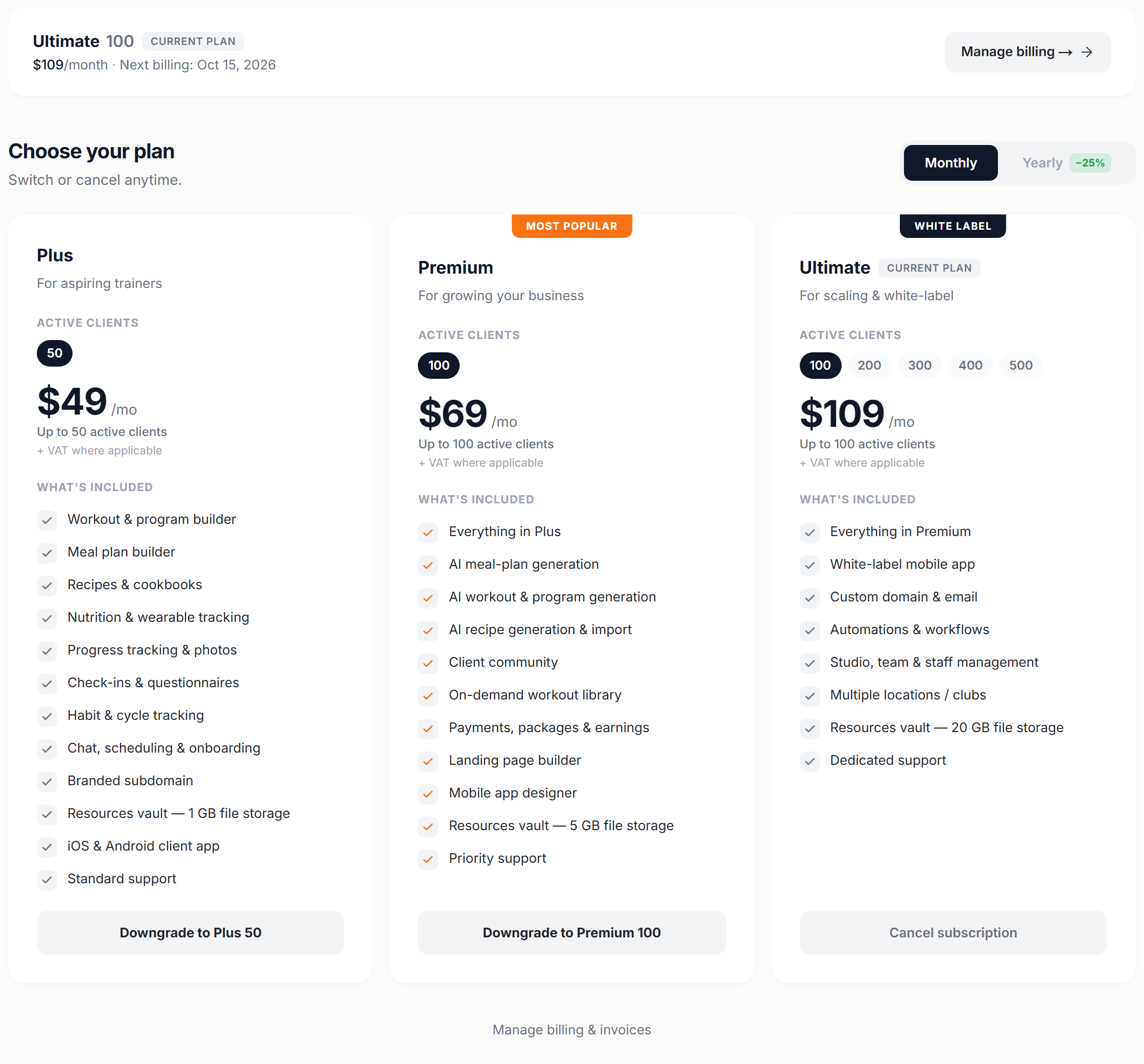
The top card shows your plan, your price and your next billing date. Manage billing opens the Stripe billing portal.
Plans
- Basic
- 0 active clients, view only. It has no card: you land on it when you cancel. Your data stays readable.
- Plus
- Up to 50 active clients. Workout, program and meal plan builders, habit and cycle tracking, branded subdomain.
- Premium
- Up to 100 active clients. Everything in Plus, plus AI generation, payments and earnings, community, landing page builder and mobile app designer.
- Ultimate
- 100 to 500 active clients, chosen with the chips on the card. Everything in Premium, plus a white-label app, custom domain and email, automations, studio and team management and multiple locations.
Choose Monthly or Yearly. Yearly costs nine months instead of twelve (25% off). Plans are billed in USD, EUR, GBP or AUD based on your country, with VAT or sales tax added at checkout.
New trainers get a 14-day free trial on Plus, Premium or Ultimate. You add a card when you pick the plan and nothing is charged until the trial ends. There is one trial per account.
Changing plan
- Upgrade
- Click the button on a higher plan's card. For Ultimate, choose your active-client tier first. The window shows the prorated amount due today and the new features unlock right away.
- Downgrade
- Click the button on a lower plan's card, or Cancel subscription on your current card to stop paying. It applies at the end of the billing period and is not refunded. Until then you can undo it with Cancel scheduled downgrade.
Before you confirm a downgrade, Scraler shows which clients will be archived to fit the new limit and which client subscriptions will end. Nothing is deleted. Archived clients keep their data and can be reactivated when you have room again.
Manage billing & invoices opens the Stripe portal, where you download invoices and update your card. Cancelling your plan is done in Scraler, not in the portal.